


TASK # 1:
Write source code to display “My name is xyz. I am First semester student of Electrical Engineering @ FAST-NU” at output screen?
int main(){
	string name;
	//cin >> name;
	name = "JOSH";
	cout << "My name is " << name << ". I am First semester student of Electrical Engineering @ FAST-NU";
	return 0;
}
TASK # 2:
Write a program that generates the following table: 1990 135 1991 7290 1992 11300 1993 16200 Use a single cout statement for all output.
int main(){
	string tab = "    ";
	cout << "1990" << tab << "135" << endl
	<< "1991" << tab << "7290" << endl
	<< "1992" << tab << "11399" << endl
	<< "1993" << tab << "16200" << endl;
	return 0;
}
TASK # 3:
Write a program to enter velocity, acceleration and time and print final velocity using the formula: v = u + a * t.
int main(){
	float u;
	float v;
	float a;
	float t;

	cout << "Enter init_velocity: ";
	cin >> u;

	cout << "Enter acceleration: ";
	cin >> a;

	cout << "Enter time: ";
	cin >> t;

	v = u + a*t;
	cout << "final velocity is: " << v << endl;
	return 0;
}
TASK # 4:
Write a program to enter five integers and print their average at the output.
int main(){
	float num; // Can use int
	float sum = 0; // but averages are not always whole numbers
	for (int i =1; i <=5; i++){
		cout << "Input integer #" << i;
		cin << num;
		sum = sum + num;
	}
	cout << "Avg is " << (sum/5);
	return 0;
}
TASK # 5:
Write a program to generate Salary Slip for at least five (5) employees one by one. The output will present in a different screen. On First screen, the following information will be taken by user for each of 5 employees.
- Employee’s Name
- Employment code no.
- Designation
- Basic Salary The Second screen will only use to display/show the data entered by user on first screen. (First screen will only use for data entering/input values)
Example of using cls or clear
They basically clear the screen of the terminal
#include <stdlib.h>

int main(){
    string name;
    cout << "ENTER NAME: ";
    cin >> name;
	system("clear"); // For linux
	// system("cls"); // For Windows
	cout << "The name is " << name << endl;
	return 0;
}
for the task
int main(){
	string name;
	int code;
	string designation;
	int salary;

	// Input screen
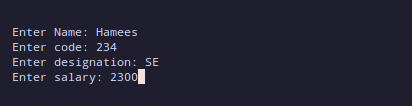
	cout << "Enter Name: ";
	cin >> name;

	cout << "Enter code: ";
	cin >> code;

	cout << "Enter designation: ";
	cin >> designation;

	cout << "Enter salary: ";
	cin >> salary;

	system("clear"); // This is for linux , use cls for windows systems

	// Output Screen
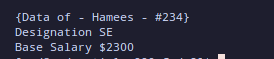
	cout << "{Data of - " << name << " - " << "#" << code << "}" << endl;
	cout << "Designation " << designation << endl;
	cout << "Base Salary $" << salary << endl;


	return 0;

}
Screen 1
Screen 2
- This code can be improved by using
getlinefor designation