


As a person who just becomes outright bored at watching tutorial videos, I thought It’d be best to make a simple TicTacToe game and change the styles and design as we go along from the documentation provided at React docs.
Immediately I was faced with an odd error that came out of nowhere while the reasoning being mysterious too!
./src/App.js
  Line 4:  'React' must be in scope when using JSX  react/react-in-jsx-scope
  Search for the keywords to learn more about each error.
Which was fixed by adding the line
import React from 'react'; At the start of App.js
The contents of App.js being:
import React from 'react';

export default function Square() {
  return <button className="square">X</button>;
}
Here, This code is a component or a ‘part’ of the bigger picture you can say,
“A component being a reusable piece of code that represents a part of a user interface”
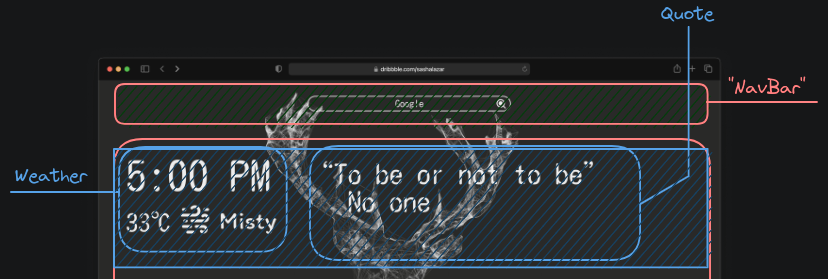
For example in this, The parts can be broken into components like this and can even be broken into sub-components! (Like NavBar has the Search engine)
exportAllows the function to be accessible outside of the filedefaultsays that this is the main function in the file
index.js
This file is the connection of all your components to the overall web application that you have running
import React, { StrictMode } from "react";
import { createRoot } from "react-dom/client";
import "./styles.css";

import App from "./App";- Imports the necessary libraries, Component(App), Styles for the components
const root = createRoot(document.getElementById("root"));
root.render(
  <StrictMode>
    <App />
  </StrictMode>
);
This part imports the components in their appropriate positions/Sections and throws it out in the form of index.html
App.js
Now one of the fundamental things to keep in mind for react is that React components need to return a single JSX element ! Solutions:
- add a
<div> MULTIPLE COMPONENTS </div> - Recommended
<React.Fragments> - add
<> MULTIPLE COMPONENTS </>known as fragments.
;#For some reason, the fragments are not working and giving an error, So DIV IT IS!
IT TURNS OUT!! That <></> is not supported by all tools. So using <React.Fragments>
Props
Now that I have made a Board 3x3, I need to pass information when an event occurs (click)
So first I split the square into a different function
function Square() {
  return <button className="square">1</button>;
}

export default function Board() {
  // ...
}
This function was recalled into the Board() function like so
export default function Board() {
  return (
    <React.Fragment>
      <div className="board-row">
        <Square/>
        <Square/>
        <Square/>
      </div>
Giving Props to the function can be done by adding {variable} to the respective function
function Square({val}) {
  return <button className="square">{val}</button>;
}
Note that {} was added when that variable was recalled into the HTML, that is a distinguishing part of JSX! It can run javascript when curly brackets are added
Furthermore an event can now be easily called by adding a function handleClick
function Square({val}){
  function handleClick(){
    console.log("clickity-clack!")
  }
  return <button className='square' onClick={handleClick}> {val} </button>
}
Success!
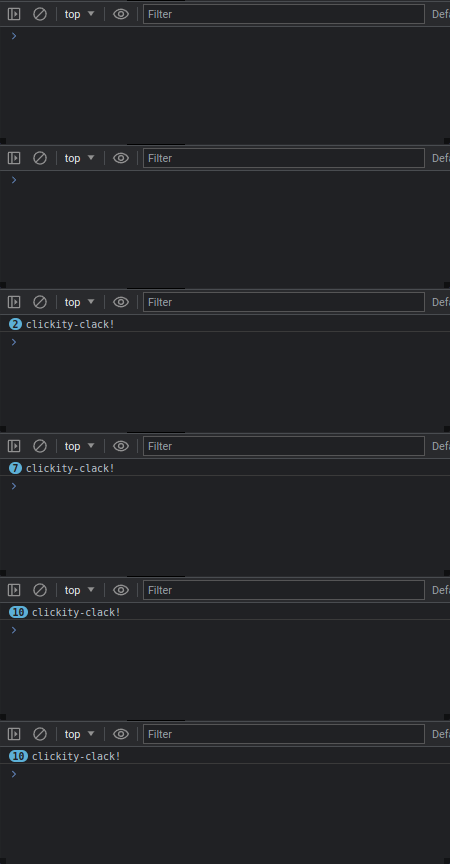
It needs to remember though, currently already clicked things can be clicked again as well useState can be used
useState is a hook in React that allows you to add state to functional components. It is a built-in function that returns an array containing a state variable and a function to update that variable.
The useState hook takes an initial value as parameter and returns an array with two elements. The first element is the current state value and the second element is a function to update the state value.
Here’s an example of using useState:
import React, { useState } from 'react';

function Counter() {
  const [count, setCount] = useState(0);

  const increment = () => {
    setCount(count + 1);
  };

  return (
    <div>
      <p>Count: {count}</p>
      <button onClick={increment}>Increment</button>
    </div>
  );
}
In this example, the count state variable is initially set to 0 using useState(0). The setCount function is used to update the value of count when the button is clicked.
AS SUCH! Our code becomes;
import {useState} from 'react'

function Square(){
  const [val, setval] = useState(null);

  function handleClick(){
    setval("X");
  }

  return (
      <button className='square' onClick={handleClick}>
       {val}
      </button>
  )
}
While this works to some extent, it has some issues
- The prop is passed by Square, And hence cannot be interacted with by the board
- As this is the case, 1 Single square component has no access to the state values of other squares The fix to this is to add the state to the board component, while this works. Fixing the problems stated above It limits the data flow to the Board alone, Meaning any component WITHIN board can access it but not before the board, So if we were to implement a system of previous moves. There wouldn’t be an easy way to manage the state of the board
So an EVEN better solution is to add another mega OMEGA component that deals with everything from the board, squares and what not. The component being Game this state will be able to manage the previous entries as well as give the control of the entire system to a single component
Making the code less spaghetti overall
SO
ADDING TIME TRAVEL !
Did some shiet on here but it’s alright