


Six Steps of Problem Solving
- Identify the problem
- Understand the problem
- Identify alternative ways to solve the problem
- Select the best way to solve the problem from the list of alternative solutions
- List instructions that enable you to solve the problem from the list of alternative solutions
- List instructions that enable you to solve the problem using the selected solution.
- Evaluate the solution
Algorithmic solutions is are those which can be solved using a specific amount of steps and are not dependent on senses, experience, perception or opinions
What problem can be solved by computer ?
- When the solution can be produced by a set of step-by-step procedures or actions.
- This step-by-step action is called an algorithm.
- The algorithm will process some inputs and produced output.
- Solving problem by computer undergo two phases:
- Phase 1:
- Organizing the problem or pre-programming phase.
- Phase 2:
- Programming phase.
- Phase 1:
Pre Programming Phase
- Analyzing the problem.
HIPO Hierarchy Input Process-Outputor PAC Programming Analysis Chart (PAC)- Developing the Input-Process-Output (IPO) Chart.
- Drawing Program flowcharts.
- Writing Algorithms.
PAC Problem Analysis Chart
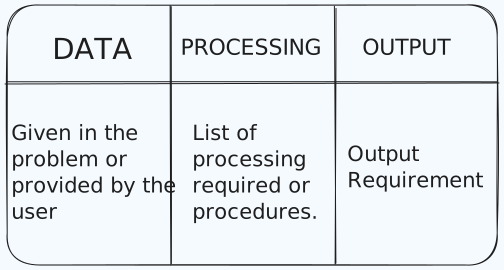
- Emphasis on Data? eg
| Data | Processing | Output |
|---|---|---|
| Hours work, pay rate | Salary = Hours work * payrate | Salary |
Input Process Output (IPO) Chart
• Extends and organizes the information in the Problem Analysis Chart. • It shows in more detail what data items are input, what are the processing or modules on that data, and what will be the result or output. • It extends information from PAC. eg
| Input | Processing | Module | Output |
|---|---|---|---|
| - Hours Worked | - Enter Hourly Worked | 1100 | - Net pay |
| - PayRate | - Enter Pay Rate | 1200 | |
| - Deductions | - Calculate Gross Pay | 1000 | |
| - Enter Deductions | 2100 | ||
| - Calculate Net Pay | 2000 | ||
| - Print cheque | 3000 | ||
| - End | 0000 |
- Emphasis on Input
Q Write a Input Process Output (IPO) to convert the distance in miles to kilometers where 1.609 kilometers per mile
| Input | Processing | Module | Output |
|---|---|---|---|
| - Distance in Miles | - Enter Distance | 1000 | - Distance in kilometers |
| - Kilometer = 1.609 x distance | 2000 | ||
| - Display Kilometers | 3000 |
Q Write a input process Output (IPO) to find an area of a circle where area = pi * radius * radius
| Input | Processing | Module | Output |
|---|---|---|---|
| - radius | - Enter Radius | 1000 | - Area of a circle |
| - Area = 3.14 x Radius x Radiu | 2000 | ||
| - Display area | 3000 | ||
| - End | 0000 |
Question
Q Write an Input Process Output (IPO) that asks a user to enter the distance of a trip in miles, the miles per gallon estimate for the user’s car, and the average cost of a gallon of gas. Calculate and display the number of gallons of gas needed and the estimated cost of the trip
PAC
| Data | Processing | Output |
|---|---|---|
| distance, miles_per_gallon, cost_per_gallon inputted by user | Enter cost_per_gallon | gallons |
| Enter distance | cost | |
| Enter miles_per_gallon | ||
| - Calculate gallon = distance/miles_per_gallon | ||
| - Calculte cost = gallon * cost_per_gallon |
IPO
| Input | Processing | Module | Output |
|---|---|---|---|
| distance | Enter miles_per_gallon | 1100 | gallons |
| miles_per_gallon | Enter distance | 1200 | cost |
| cost_per_gallon | - Calculate gallon = distance/miles_per_gallon | 1000 | |
| Enter cost_per_gallon | 2100 | ||
| - Calculte cost = gallon * cost_per_gallon | 2000 | ||
| Display gallons | 3000 | ||
| Display cost | 4000 | ||
| End | 0000 |
Flowchart
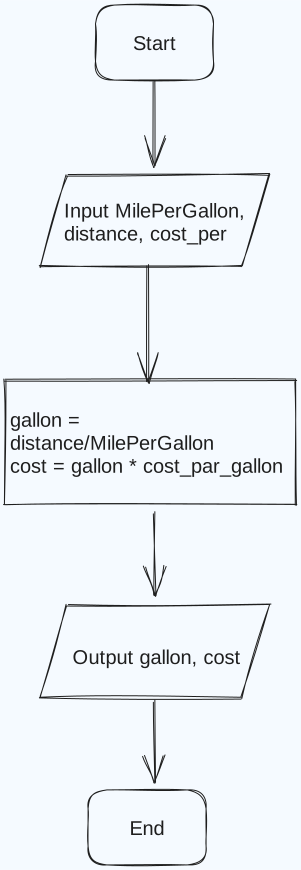
%%🖋 Edit in Excalidraw, and the dark exported image%%

Question
Make a calculator that demands two numbers, and outputs. +, -, *, \of the two
| Input | Processing | Module | Output |
|---|---|---|---|
| num1 | Enter num1 | 1100 | subtraction |
| num1 | Enter num2 | 1200 | addition |
| - Calculate subtraction = num1 - num2 | 1300 | multiplication | |
| - Calculate addition = num1 + num2 | 1400 | division | |
| - Calculate multiplication = num1*num2 | 1500 | ||
| - Calculate division = num1/num2 | 1600 | ||
| Display subtraction, addition, multiplication, division | 2000 | ||
| End | 0000 |
Question
Simple calculation of volume
| Input | Processing | Module | Output |
|---|---|---|---|
| set height = 25 | 1100 | volume | |
| set length = 40 | 1200 | ||
| set width = 18 | 1300 | ||
| Calculate | 2000 | ||
| Display vol | 3000 | ||
| End | 0000 |
Question
Calc of Hyp using side1 and side2
| Input | Processing | Module | Output |
|---|---|---|---|
| set side1 = 10 | 1100 | hyp | |
| set side2 = 8 | 1200 | ||
| Calculate | 2000 | ||
| Display hyp | 3000 | ||
| End | 0000 |